
How Trezor Cold Storage Keeps Your Crypto Safe, Offline and Under Your Control
What Is Trezor Cold Storage
If you are new to crypto, you, probably, already heard about trezor cold storage and thought it’s some fancy tech toy. But, frankly, it’s just a simple way to keep your crypto keys off the web. A Trezor cold wallet device holds your private keys on a small piece of hardware that stays offline. Your coins live on the blockchain, but the keys to move them stay with you, not on some exchange server.
The main topic here is trezor cold storage, because that’s what we are digging into. Trezor made the first hardware wallet back in 2014 - that was the Model One. They built more devices since, but the core idea stays the same: keep the keys away from hackers by keeping them offline. I like that kind of plain sense.
Most people new to this get confused: they think the wallet holds the coins. It does not. The wallet holds the private keys, while coins sit on the public ledger. So trezor cold storage is about protecting the thing that lets you spend, not the coins themselves. This shift in thinking helps a lot when you start.
Why Leave Exchange Crypto Alone
Leaving your crypto on an exchange is risky. I’m not saying this to scare you - it’s just a plain fact from how these platforms work. When you buy through a custodial exchange, they hold your coins and are free to use your money as they wish until you withdraw to self-custody. There is no guarantee they even hold what you paid for.
Look at what happened with Celsius: on June 13, 2022, that global crypto lender stopped all withdrawals and froze around 12 billion dollars in investor money. Months later, lots of it stayed unresolved. And the old Mt. Gox hack from 2014? Over 850,000 Bitcoin stolen and still not fully sorted years later. I would rather not be in that boat.
Until you withdraw to self-custody, there is no guarantee that they ever even hold the assets that you paid for.
That line from Trezor’s own blog sticks with me. When your coins sit on an exchange, you trust a third party with your money. With trezor cold storage, you cut out that middleman and become your own bank, for better or worse. The worse part: you must guard your keys. The better part: no one can freeze your funds on a whim. That trade is worth it to me.
Hot Wallets Versus Cold Wallets
A crypto wallet is a digital tool that lets you send, receive, and store crypto. But not all wallets work the same. The big split is between hot and cold. Hot wallets connect to the internet - think web, mobile, and desktop wallets. They are handy for small everyday buys but sit online where hackers can reach them.
Cold wallets are not connected to the internet, which means they never show your recovery seed or private keys to an online space. A cryptocurrency cold wallet is built for long-term holding, not for quick daily spend. You have full control of your private keys as long as you keep the device stored safe, and you don’t pay a fee to some company for that control.
Kinds of cold wallet
- Hardware wallet - keys sit on an offline device you plug into a computer
- Paper wallet - keys printed on paper, sometimes with a QR code to scan
- Sound wallet - keys encoded as a sound file on a CD or even vinyl
- Deep cold storage - any method that makes grabbing your wallet very hard, like a buried box
Most folks I talk to pick a hardware wallet: it’s the easiest to use and still keeps things offline. Trezor is one of the names you will hear first when you ask around. The point of all these cold types is the same - no internet means no remote hacker can touch your keys. That is the whole reason cold storage exists in the first place.
How Does a Cold Wallet Work
You might ask how a cold wallet actually works . Good question! A cold wallet stores your private keys on something that stays offline. The device makes and stores your private key without ever touching the web. When you want to move crypto, you plug the device into a computer or phone; the key signs the transaction on the device, then you broadcast it.
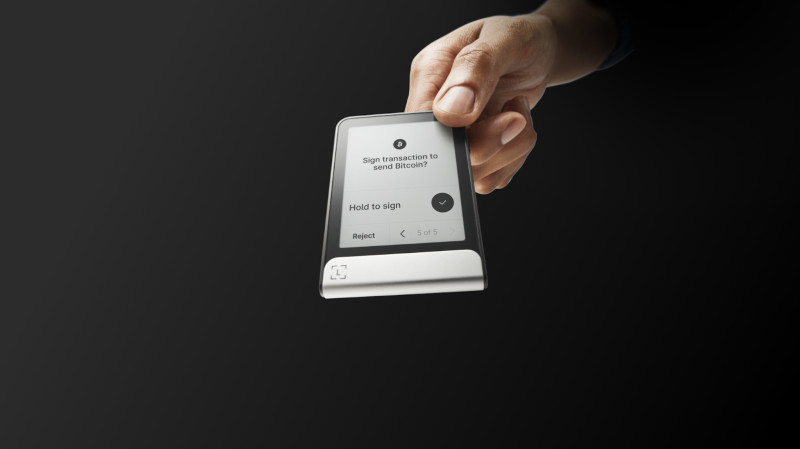
Your coins never leave the blockchain; the wallet just proves you own them and lets you send them. An offline cryptocurrency wallet like a Trezor stays safe from online threats because it is not there to be hit. The screen on the device shows the details so you can check before you confirm - that small screen is your last line of defense against a bad send. Always read it before you press okay.
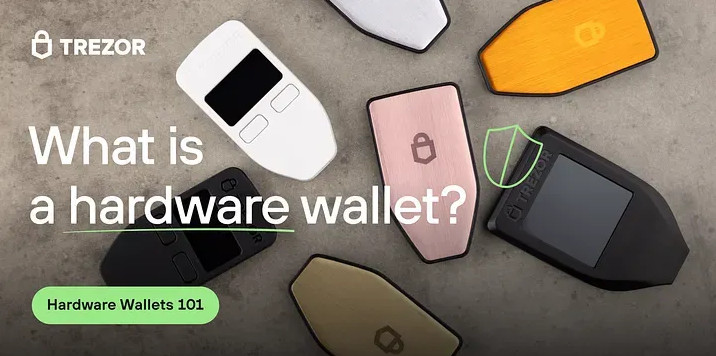
That picture shows the basic shape of a hardware wallet: small, plain, and not online. It looks like a weird little USB stick but it is your safe for digital assets. You connect it only when you need to move funds; the rest of the time it sits in a drawer, cold and quiet. That is the point - the less it is plugged in, the less chance something grabs your key.
What Is a Hardware Wallet
A hardware wallet works as your key manager. These wallets safely make and store your private key offline, use that key to let crypto transactions happen, and also make public keys so you can receive coins. Think of it as a special small safe for your digital assets.
The important thing about this safe is that it is not on the internet. It stays offline, not showing your private key to hackers. When you want to use your crypto or add more, connect the wallet to a computer or phone. Once connected, you can buy, sell, or exchange - and the key never leaves the device even while plugged in.
A cryptocurrency wallet on USB style device is what Trezor makes. The Trezor Model One is small enough to carry on a keychain. The Model T and Safe models have touchscreens. All of them keep your keys off the web until you plug in - that physical gap from the net is the whole game. Trezor Suite even has a password manager built in, so the device can guard more than coins.
Trezor Product Line and Models
Trezor started with the Model One in 2014. Today they sell a few devices: the Model One is the cheap entry pick, the Model T is the premium one with a touchscreen, and then there is the Safe 3 and Safe 5 - newer models with better security parts. SatoshiLabs, the Czech company behind Trezor, has kept building since the start.
Trezor devices you can buy
- Model One - affordable, supports bitcoin, ethereum, and other assets
- Model T - advanced model with touchscreen and broad asset support
- Safe 3 - newer entry level with a secure element chip
- Safe 5 - color touchscreen, haptic feedback, EAL6 plus secure element
Prices run from about 49 to 169 dollars depending on model. They connect to your computer or phone with USB-C and work with the open-source Trezor Suite app for managing coins. A crypto wallet on USB is what you get, simple as that. The app is where you see balances and make sends, but the device does the signing. It supports over 9,000 coins and tokens, plus NFTs through connected apps.
This image gives a look at the kind of setup you get: the device in your hand, the cable, the screen. Nothing fancy. The magic is that the key never leaves the device - even if your computer is full of malware, your key stays put. That is why people call it cold storage; the device is the cold part.
Trezor Safe 5 Thoughts
I have read a lot about the Safe 5 and it looks like the sweet spot. It is not the cheapest Trezor, nor the newest. But it gives a stronger layered-security story than the Safe 3 and feels more proven than the Safe 7. For most regular users, that middle path is the smart one.
The Safe 5 is the better choice right now because it feels more conservative in the right places.
That line from a review I read sums it up. The Safe 5 has a microSD slot and an EAL6 plus secure element. Trezor says the Safe 5 was not hit by a specific physical supply-chain style attack that could bypass certain Safe 3 countermeasures. The Safe 5 uses a newer microcontroller platform - that matters when you pick a device. A blog post from November 2024 disclosed the issue, and Trezor was clear about which model was safe.
The Safe 3 is still a legit wallet, but the Safe 5 sits on the safer side of that real-world talk. The Safe 5 also supports on-device passphrase entry - a clean way to add a layer between a stolen seed and your actual holdings. Passphrases are not just for experts; they are one of the easiest ways to hide a wallet inside your wallet.
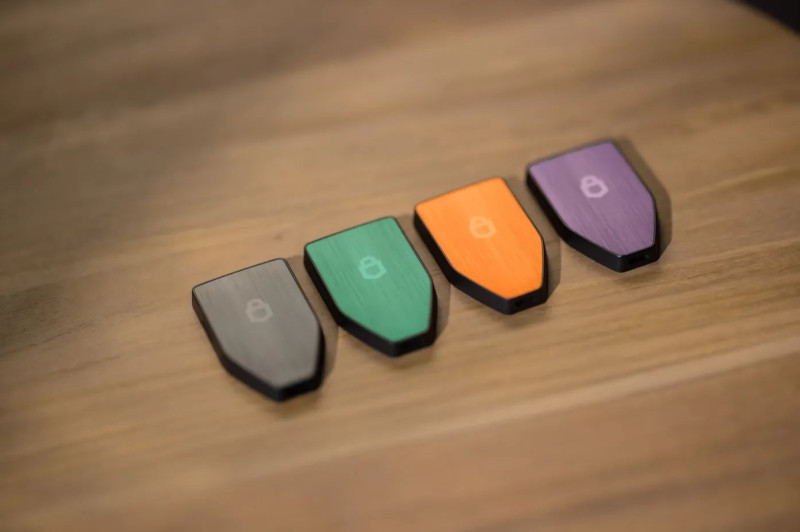
Here are the Safe 5 units in their colors. Nice looking, but I care more about the guts. The microSD slot lets you add a card for extra security steps; the touchscreen makes passphrase entry less of a pain. For most people, this is the Trezor I would point to - not the flashiest, but it does the job without drama.
Layered Security With Trezor
Good cold storage is not one barrier - it is layers. With the Trezor Safe 5, you build those layers through the device itself, your PIN, your passphrase, and optional microSD-based security features. If someone steals the device, do they know your PIN? If they know your PIN, do they know your passphrase? If they know both, did they also get the microSD card you stored elsewhere?
Trezor’s hardware security page includes the Safe 5’s microSD slot as part of its design - that is one reason the Safe 5 stands out: it gives you multiple layers you can actually use. A basic cold wallet setup with just one key is okay, but layers make it better. You do not want a single slip to drain your funds. The PIN has exponential backoff too, so brute-force guesses get slower fast.
Seed Phrase and Recovery
Here is the part that calms people down. If your device is lost, damaged, or stolen, you can use your recovery seed to restore access. You enter the words of your seed into a new Trezor device. Your coins stay safe because they are on the blockchain, not on the device - the device is just a door, not the house.
Your coins remain safe! If your device is lost, damaged, or stolen, you can use your recovery seed to restore access to your entire wallet.
This is huge. A hardware wallet does not store your coins; it stores your private keys. With your seed phrase, you can recover on any compatible Trezor or BIP-39 wallet. Test recovery with a small amount first, just to be safe. Trezor has never lost user funds due to a device flaw in its history - that track record is part of why folks trust the brand. Write the seed on the card they give you, never on a phone.
Shamir Backup and Extra Safety
Standard seed phrases are 12 or 24 words. Lose that paper and you are in trouble. Trezor offers Shamir Backup using the SLIP-39 standard: it splits your recovery seed into multiple shares. You might have 20 shares and need 3-of-5 to rebuild. Store shares in different places like a vault, with family, or on metal plates. This is for the Model T and Safe series.
This kills the single point of failure: lose one share, no access for thieves. The Model One uses only standard BIP-39, so you would need a newer model for Shamir. But the idea is plain - do not put all your eggs in one basket. Trezor’s open-source code lets developers check how this works; that openness builds trust in the method. You can read the spec yourself if you like.
Ways to store your seed
- Paper card that comes with the device, kept in a drawer
- Metal plate engraved so fire or water will not ruin it
- Shamir shares split and placed in different physical spots
- Hidden passphrase that acts like a second factor on top of seed
Pick what fits your life. The key point is never type the seed into a computer - ever. That is the fastest way to lose everything. Write it, store it, and remember where you put it. A forgotten seed is as bad as a lost one, so pick a spot you will not blank on later. Some folks engrave on steel for peace of mind.
Cold Wallet Trezor Setup Steps
Setting up a Trezor cold wallet is straightforward. I will walk through the basic path: download Trezor Suite from trezor.io, connect the device via USB, choose create new wallet, write down your seed on the card provided. Never store it on a computer. Verify the site address before you download.
Setup in plain steps
- Unbox and install Trezor Suite from the official site, check sums
- Initialize device and choose create new wallet on the screen
- Write down your 12 or 20 word seed on paper, never digital
- Set a PIN on the device and add passphrase if you want
- Update firmware when Suite asks, always do this step
- Add accounts and start receiving, verify addresses on device
Buy direct from trezor.io to avoid tampered units. A wiped device after setup can help if you travel. The whole thing takes maybe half an hour your first time. Do not rush the seed writing part - that is the one step you cannot redo if you mess up. Use the wipe feature before you fly so a border check does not show your real balance.
This image shows a vault style setup with multiple keys. Even a basic Trezor setup can later join such a scheme. The point is you start simple, then add layers as your stack grows. No need to be an expert on day one - just get the device, write the seed, and move a small test amount first to learn the flow.
Using Cold Wallet App With Trezor
One overlooked reason to buy a Trezor is the software. A cold wallet app like Trezor Suite makes the device useful day to day. Trezor’s own guides say generating fresh receive addresses helps preserve privacy, and extra accounts can stop broader transaction visibility tied to one xpub. The app runs on Windows, Mac, Linux, and Android.
In plain words: do not reuse the same receive address over and over - it makes it easy for exchanges or anyone watching the chain to link your balances. Trezor Suite makes new addresses simple, and that is a real privacy win. The wallet is not just the plastic in your hand; it is the software around it too. The app also lets you stake some coins through third-party tools.
Suite supports CoinJoin for Bitcoin mixing and Tor to hide your IP. For someone who cares about keeping their business quiet, that is a big deal. You do not need to use those features, but they are there. I like having the choice without hunting down weird add-ons - the interface is clean enough that a beginner can find the privacy tabs without getting lost.
Other Cold Storage Wallet Choices
Trezor is not the only name. A Ledger hardware wallet is the other big one folks mention. There is also BitBox02, Coldcard MK4, Cypherock X1, Ellipal Titan, KeepKey, NGrave Zero, and more. Each has its own feel and price; some are bitcoin-only, some support thousands of assets.
Other cold wallets to know
- BitBox02 - small, OLED screen, microSD backup, around 125 pounds
- Coldcard MK4 - bitcoin only, air gapped, around 185 pounds
- Cypherock X1 - splits keys across four cards, 9000 plus assets
- KeepKey - cheap around 50 pounds, wide screen, easy for beginners
- NGrave Zero - highest security cert EAL7, touchscreen, pricey
When you pick, look at security features, ease of use, compatibility, backup options, support, and reputation. The best pick depends on your needs, but trezor cold storage stays a top pick for most. The open-source nature of Trezor is a big reason for that - you can read the code yourself if you know how. A ledger hard wallet is closed-source on some parts, which some folks dislike.
Multisig Vaults and More Keys
A single hardware wallet still has one weak spot: if your device is lost and your seed is compromised, your assets are gone. That is why some folks add multisig vaults - you use multiple keys across different devices. A 3-key vault might use one Trezor, one mobile key, and one recovery key. This spreads the risk around.
Think of this like a bank vault with multiple keys that must be inserted and turned at the same time to open the vault.
Casa builds these setups. With a 5-key vault, you need three hardware wallets plus a mobile key and recovery key. If hackers steal one seed, they still cannot move your BTC or ETH. This adds redundancy and spreads personal risk. For life-changing amounts, that kind of setup makes sense - the trade-off is more gear to track and more steps to sign.
At Casa, they call these vaults multisig wallets. More than one private key is needed to access the coins at an address; to spend, you sign with a majority of keys. It is like a group sign-off. If one key is lost or stolen, the others still protect you - good idea for big holders. You can use your existing Trezor as one signer if it is not compromised.
Best Wallet to Use for Cryptocurrency
If you want my plain opinion on the best wallet to use for cryptocurrency , Trezor Safe 5 is a strong start for most people. It is not the flashiest, nor the most convenience-driven, but it makes the most sense. The Safe 7 brings Bluetooth and a bigger screen, but more features mean more to go wrong.
You get microSD support, passphrase support, open-source trust, and a software environment that does more for privacy than many realize. The Safe 3 is still legit. The Safe 7 adds Bluetooth and quantum-ready talk but that firmware is still rolling out. For now, conservative wins in my book - a newer model is not always the safer one in crypto.
Do not forget the human part. Security should come first, but if a wallet is miserable to use, people make mistakes. The Safe 5 gives enough usability without giving up what matters. Buy it from the source, learn the steps, and you are most of the way there. No need to overthink the rest - move a little coin, test recovery, then move the rest.
Offline Cryptocurrency Wallet Privacy
An offline cryptocurrency wallet like Trezor gives you privacy by keeping keys off the web. But the Suite app adds more: built-in CoinJoin for Bitcoin mixing and Tor support anonymize your IP. That matters in a world watching transactions - even your ISP will not see what you sign.
Trezor’s firmware is fully open-source, audited by third parties like Trail of Bits. That transparency means less blind trust - you can verify what you are running. For a regular person who cares about keeping their business private, that is a big deal. I would rather own my keys and my data; no exchange should know my whole history. The FIDO2 cert also lets the device work as a login key for Google and GitHub.
My Plain Take on Crypto Safety
I am not a crypto expert. I just care about keeping my coins safe without losing my mind. Trezor cold storage does that for me in plain terms: you own 100 percent of your coins, your wallet is safe offline, your data stays anonymous. Those three things beat leaving funds on some app that could lock you out.
Hey, do not skip the seed phrase part. Write it down, store it safe - that is the one thing that saves you if the device breaks. And buy from the official source, not some random shop; a tampered unit defeats the whole point. The price of peace of mind is a little homework. Read the manual once, it is short.
The crypto world will keep changing, but keeping keys offline is a rule that holds. Whether you pick Trezor, a ledger hard wallet, or another brand, get your coins off exchanges - that is the main takeaway I would leave you with. Start small, learn the steps, then move the rest. You got this. A hardware wallet is a weird little stick that could save your stack.
Comments on “How Trezor Cold Storage Keeps Your Crypto Safe, Offline and Under Your Control”
No comments yet. Be the first to share your thoughts.