Compare the Best Wallets for Cryptocurrency and Keep Your Funds Safer
Let me say this upfront: a cryptocurrency wallet doesn't actually hold your coins. Neither does a fancy hardware device, a mobile app, or that exchange account you're using. What it really holds - or manages - is the cryptographic keys that prove you own stuff on a blockchain. Mess up the key part, and you can lose everything. Nail it, and your money stays yours, no questions asked.
A cryptocurrency wallet does not hold cryptocurrency itself. It stores or manages the keys that provide access to assets recorded on a blockchain.
When you're hunting for the best wallet to use for cryptocurrency, you're not just picking an app with a nice interface. You're picking who (or what) controls those keys. That's the whole game in one choice. Custodial accounts hand your keys to an exchange. Self-custody wallets put them in your hands. The trade-off is convenience versus control, every single time.
I've been through this maze myself, reading guide after guide, trying to figure out what actually matters. Here's what I've learned, broken down so you can skip the parts that don't apply to your situation.
What Keys a Cryptocurrency Wallet Actually Manages
You get two things from any wallet: a public key (your receiving address, like an account number people send money to) and a private key (your signature, like a password that proves you can spend it). Most wallets also give you a seed phrase - a list of random words that can rebuild your entire wallet if your device dies, gets stolen, or you forget your password.
IF YOU DON'T HAVE YOUR KEYS, YOU DON'T HAVE YOUR BITCOIN.
The public/private key pair links to your activity on the blockchain. When someone sends you crypto, they sign with their private key and your public address appears as the destination. To spend it later, you sign with your private key. Lose both the private key and the seed phrase, and your coins stay on the blockchain forever - but they're effectively gone. The wallet interface is just a way to interact with those keys.
This is why define wallets matter in a practical sense, not just a technical one. The wallet is your gateway to signing transactions, checking balances, and moving funds. Without the right keys backed up properly, the interface is useless.
Ways wallets are described
A public key or address: where people send crypto to you
A private key: your signature that proves you can spend
A seed phrase: the backup words that rebuild your wallet if you lose everything else
Access to a blockchain: without it, you can't send or receive anything
How to Think About Wallet Categories
Wallets fall into groups based on how they connect to the internet, what form they take, and who controls the keys. These aren't mutually exclusive - a single wallet can be hot, custodial, and software-based all at once. But the most important split for most people is connection: hot (online), cold (offline), or warm (something in between).
Ways to categorize wallets
Hot wallets: connected to the internet (web, mobile apps, desktop apps, exchange accounts)
Warm wallets: offline signing with online transaction prep, plus human authorization
Connection type is usually the first filter most people use because it directly maps to risk. Hot wallets are convenient but exposed. Cold wallets are secure but slow. Warm wallets sit in the middle, trying to be both.
Hot Wallets and Why You Might Actually Want One
A hot wallet is any wallet connected to the internet. That includes exchange accounts, web-based wallets, mobile apps, and desktop software. The defining trait isn't the shape - it's the connection. If your private key touches a network, it's hot.
For a secure hot wallet selection, think about what you actually need. If you're buying coffee with crypto or swapping tokens daily, you want something that opens fast and doesn't make you think too hard. If you're parking a big balance for easy access, you're trading convenience for risk.
A hot wallet is generally more appropriate for small amounts that are intended for spending or frequent transactions than for long-term storage of an entire portfolio.
The trade-off is real. Hot wallets let you move money in seconds, but they live in an environment where phishing, malware, weak passwords, and exchange hacks can all reach your keys. Most successful wallet attacks hit hot wallets, because that's where the keys hang out online.
But here's the thing - you can't spend crypto stored entirely offline without bringing it online eventually. For most people, having a small amount in a well-chosen hot wallet makes sense. The key is keeping that amount reasonable and never treating a hot wallet like a vault.
Software and Mobile Wallets: Your Quick-Access Options
Software wallets are the easiest place to start. You download an app, follow setup prompts, and you're ready to receive your first transaction. Mobile wallets are the most common form - apps that live on your phone and handle keys locally or connect to a service.
When you want to create a crypto wallet for daily use, software is where most people land. You install it, write down your seed phrase, and start transacting. The convenience is real, and for small amounts, that's often worth the extra risk exposure.
Full-node versus light is the main technical split here. A full-node wallet downloads and verifies the entire blockchain - more secure, but it eats storage and bandwidth. A light wallet trusts third-party servers for blockchain data - faster, but you're putting some trust in someone else's infrastructure. For phones, light wallets are usually the only practical choice.
Things that affect software wallet security
Device security: malware, OS vulnerabilities, compromised apps
Update frequency: outdated software may have known exploits
Key storage: keys on-device vs. encrypted keystore vs. secure element
Backup reliability: seed phrase quality and storage method
Full nodes store a full copy of the blockchain and validate every transaction using the device's own copy of the chain. They don't need a third party for blockchain data, which cuts down on external dependencies. But that Bitcoin blockchain, for example, has grown to hundreds of gigabytes, making full nodes tough to run on phones.
Software wallets are generally the quickest and easiest starting point for beginners.
Your crypto wallet download is just the first step. The seed phrase backup is what matters. Write those words down. Store them somewhere safe. Test the restore before you fund the wallet with anything serious.
Crypto Cold Wallets: Where Real Storage Lives
When you're ready to move serious money off the internet, you're looking at crypto cold wallets. These keep your private keys offline, ideally in a device that never connects to a network. The two main flavors are hardware wallets and paper wallets.
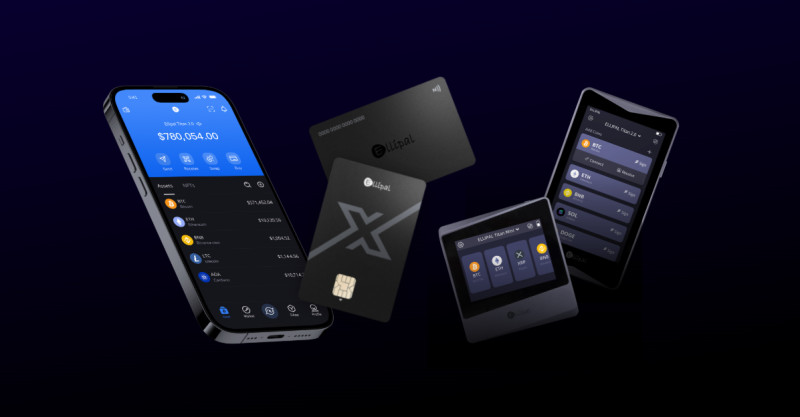
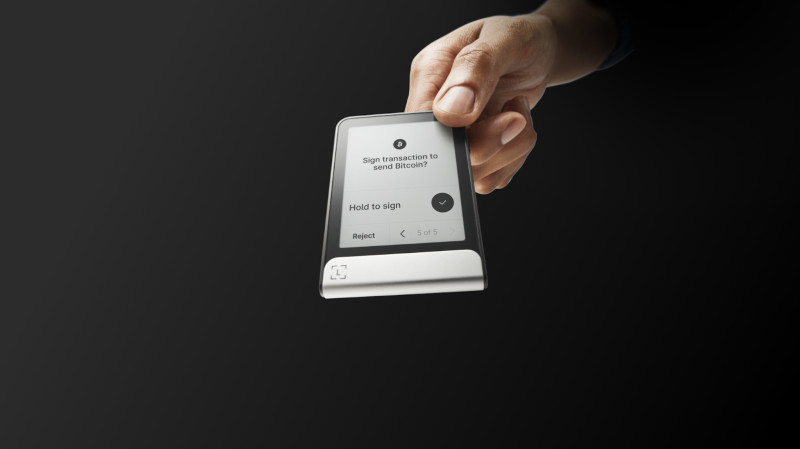
A hardware wallet is a small physical device - usually something that looks like a USB stick - that stores your keys and signs transactions without ever exposing the private key to your computer or phone. You connect it when you need to sign, confirm details on its own screen, and the key itself stays trapped inside.
Security-focused hardware wallets use special chips called Secure Elements and PIN protection. The good ones let you sign transactions while your computer handles the blockchain interface - the key never leaves the device. For most people holding real money long-term, a hardware wallet is the baseline.
But cold wallets come with their own headaches. They cost money (anywhere from under a hundred bucks to a few hundred). You need another device to actually send a transaction. And you're now managing physical security - someone could steal the device, or you could lose it and forget where you put the seed phrase.
Cold storage options compared
Hardware wallets: dedicated offline devices (Ledger, Trezor) with screens and buttons for signing
Paper wallets: keys printed or written on paper, often as QR codes
Metal backups: seed phrases engraved on steel or titanium plates for fire/water resistance
Paper Wallets: Cheap, But Tricky
Paper wallets store your keys on actual paper instead of a device. You generate a key pair using an offline tool, print it (often as QR codes), and stash the paper somewhere safe. To spend, you sweep the funds into a connected wallet first.
The appeal is obvious: a piece of paper can't be hacked remotely. If your keys stay offline, online attackers can't grab them. But paper brings physical risks - fire, water, animals, kids, and the eternal problem of misplacing it.
The worst mistake I see people make is treating paper wallets as fire-and-forget. They print one copy, stick it in a drawer, and forget. A fire takes it out. A kid draws on it. You move and lose track of it. The guidance is to make multiple copies and spread them across secure locations, but every copy you make is another place your keys could surface.
Paper wallets are not exposed to online hacking while the keys remain offline. Their main risks include fire, flood, heat, animals, children, accidental disposal, theft, and unauthorized photography.
Paper wallets are designed primarily for offline storage. To make a payment, you generally need to transfer or "sweep" funds from the paper wallet into a software, mobile, or hardware wallet that can interact with a blockchain network. This makes paper storage less convenient for frequent use.
One older guide called paper the most secure option "in their own way" because they can't be hacked remotely. Another more recent write-up said hardware is the strongest option for maximum security but also treats paper as a useful offline option if physical damage, loss, and theft are addressed. The difference comes down to threat models - online and software attacks are a bigger concern for hot wallets, while fire, water, physical theft, and misplaced storage matter more for paper.
Warm Wallets: The Middle Ground
Warm wallets try to split the difference. Your keys stay online, but transactions require a second authorization step that the user has to approve manually. It's not as automatic as a hot wallet, and it's not as isolated as a cold wallet.
This design combines online accessibility with human authorization. A warm wallet is described as more efficient than a cold wallet but less automated than a hot wallet because the user must participate in transaction signing. Keys remain online for transaction preparation, but human approval is still required to sign and send.
One business-focused warm-wallet model adds time-based one-time password authentication in a confidential computing environment. This means even if the wallet backend gets compromised, an attacker doesn't walk away with your keys or the ability to sign transactions. It's basically two-factor authentication for wallet operations.
Custodial vs Non-Custodial Wallets
This is the fork in the road for most people. A custodial wallet means a third party (usually an exchange) holds your keys. When you buy crypto on Coinbase, Binance, or similar platforms, you're using a custodial wallet. The exchange controls the keys, and you log in with a username and password.
A non-custodial wallet means you hold the keys. No intermediary stands between you and your crypto. You write down your own seed phrase, back it up yourself, and if you lose it, it's gone. No customer service to call. No reset button. Just you and your keys.
Who holds the keys and what that means
Custodial: exchange or service controls keys, you trust them not to freeze or lose your funds
Non-custodial: you control keys directly, full responsibility for backup and security
Custodial wallets are nice for beginners. No seed phrase to lose. Login works like a normal website. Easy to trade and move funds around. But if the exchange gets hacked, goes bankrupt, or decides to freeze your account, you're at their mercy. Exchanges can also be valuable targets for attackers, making large balances in custodial exchange wallets more exposed.
With a custodial wallet, users often interact with an exchange account and interface rather than controlling the private keys directly. The exchange is responsible for keeping the keys secure.
Non-custodial wallets are scary at first because the responsibility shifts entirely to you. Lose your seed phrase, and your money is gone forever. But no third party can freeze your account or run off with your wallet. For most serious holders, this trade-off is worth it.
You can use both types. Exchange accounts can provide convenient access for small amounts or active trading, while non-custodial cold wallets hold larger or long-term balances. The key-storage decision comes down to who can access the private key - you or someone else.
Mixing Wallet Types: Use Both
Most people end up with more than one wallet, and that's smart. The typical split: keep a small amount in a hot wallet for daily transactions, and the bulk in a hardware wallet or other cold storage for long-term holding.
Exchanges work fine for active trading, but I'd move the proceeds out to a non-custodial wallet fairly quickly. If one platform gets cracked, you don't want your entire balance in the same bucket.
Think about liquidity and security needs for each chunk of crypto you own. Active trading money lives in something quick and connected. Long-term savings goes somewhere offline where it can sit for months or years without touching the internet.
Matching wallet type to use case
Frequent transactions and small spending amounts: hot wallets (mobile apps, exchange accounts)
Long-term savings and large balances: cold wallets (hardware devices, metal seed backups)
Active trading: exchange accounts or connected hot wallets
Everyday spending money: mobile wallet or secure hot wallet
How to Pick the Best Wallet for Cryptocurrency
Once you know your categories, the comparison gets more detailed. Here's what I look at when evaluating any wallet:
What to compare when shopping for a wallet
Security: encryption, key isolation, two-factor authentication, multisig support, secure elements
Custody: who controls the keys - you, the service provider, or both
Supported assets: does it handle the coins and tokens you actually want to store
Device compatibility: iOS, Android, desktop, browser - does it work where you need it
User interface: is it usable for your skill level, or does it fight you at every turn
Backup and recovery: seed phrases, encrypted backups, recovery options
Fees: transaction fees, network fees, conversion fees, trading fees
Reputation: track record, audits, community activity, update frequency
Security always comes first, but don't ignore usability. A good crypto wallet that nobody can figure out how to use is no good to anyone. I've actually walked away from wallets that were theoretically more secure but practically a nightmare to operate.
A good cryptocurrency wallet balances protection with access. If it's too hard to spend from, you might make mistakes. If it's too easy, you're exposed. Finding that sweet spot is the whole art of wallet selection.
Features that matter when comparing wallets
Strong encryption to protect keys at rest
Private-key isolation so keys never leave the device unencrypted
Two-factor authentication for account access
Biometrics like fingerprint or face unlock for convenience
Multisig support for distributed authorization
Secure elements for hardware wallets
Independent security audits by third parties
Security Practices That Actually Matter
Picking the right wallet is half the battle. The other half is how you actually use it. Here are the practices I never skip:
Essential security habits for any wallet
Never share your private key or seed phrase with anyone - period, no exceptions
Keep only what you need for daily spending in hot wallets; move the rest to cold storage
Use strong, unique passwords (and a password manager) for any account-based wallet
Enable two-factor authentication wherever it's offered, using an app, not SMS
Keep wallet software, apps, and OS updated with the latest security patches
Write down seed phrases accurately and store them in multiple secure physical locations
Verify destination addresses carefully - crypto transactions are nearly impossible to reverse
Multisig wallets require multiple private keys to authorize a transaction. Because authorization is distributed across multiple keys, a single compromised device or key may not be enough to move funds. It adds complexity, but for serious holdings, it's worth considering.
Private keys and seed phrases must be kept secret. Users should never share a private key or seed phrase.
Backups should be created and verified. Regular backups help you recover a software or hardware wallet after device loss or damage. Keep them in multiple secure locations.
Software must remain current. Computer, smartphone, operating-system, browser, and wallet updates often contain security patches. Running the oldest version may leave you exposed to known vulnerabilities.
Destination addresses deserve double-checking. Sending crypto to the wrong address can be costly - blockchain transfers are difficult or even impossible to reverse. A hardware wallet or offline paper wallet can't help if you sign a transfer to the wrong place.
Specific Wallets Worth Knowing About
There are dozens of solid options out there. Here are some that keep coming up in serious discussions:
Some wallets people consistently mention
Hardware wallets: Ledger devices and Trezor - dedicated offline signing for maximum security
Mobile wallets: Trust Wallet, Exodus, and similar apps for everyday spending and trading
Desktop wallets: full-node options like Bitcoin Core for privacy-focused verification
Exchange wallets: Binance, Coinbase, and other platforms for custodial trading
Paper and metal storage: for long-term cold storage when done carefully with backups
Trust Wallet offers end-to-end encryption and a built-in browser for decentralized apps. Its interface works for both beginners and experienced users, with features like balance display, transaction tracking, and QR-code scanning. It supports Bitcoin, Ethereum, and a wide range of other digital assets.
Binance shows up a lot as a widely used platform. Its security features include two-factor authentication, cold storage for customer funds, and encryption. It supports a broad selection of assets and offers staking and decentralized finance opportunities to earn rewards. Competitive fees and regular updates are among its selling points.
Trezor acts like a small computer that generates private keys offline. It supports a password in addition to its seed system and can be used online and offline. The 2018 writeup considered it highly secure, especially when used offline, unless someone observes the device during use.
Security information should be updated as the cryptocurrency ecosystem changes. Wallet providers, interfaces, authentication methods, and threats evolve over time.
Cwallet showed up in one comparison as a secure and accessible option with strong encryption, advanced authentication, multisignature support, and offline storage choices. It supports Bitcoin, Ethereum, and additional cryptocurrencies. Features include fund management, transaction tracking, real-time market data, and exchange integration for trading and swapping.
Ledger devices - like the Ledger Nano S and Ledger Nano X - use a screen and secure chip design. A writeup from a few years back called them very secure. Many hardware wallet users gravitate toward Ledger and Trezor because they keep keys isolated from internet-connected computers.
Getting Started Without Getting Scared
If you're asking yourself how to get a wallet for cryptocurrency, the answer is simpler than most people think. Download a reputable app, follow the setup process, and write down that seed phrase. Store it somewhere safe. Don't share it with anyone. Done.
Keep your seed phrase offline.
The hard part isn't setting up a wallet - it's choosing which one and using it consistently and securely. Start small. Get comfortable with sending and receiving. Learn how backups work before you trust a large balance to any single solution.
Most importantly, remember that your keys are your responsibility once you go non-custodial. There's no reset button, no customer service to call when you've lost access. Write down that seed phrase. Store it safely. And don't put more money in than you can afford to lose while you're still learning the ropes.
Quick checklist for wallet setup
Choose a reputable wallet that supports your coins and networks
Write down your seed phrase immediately - never store it digitally
Verify your backup by restoring the wallet before funding it heavily
Start with a small amount to get comfortable with sending and receiving
Plan where your long-term holdings will live (usually a hardware or cold wallet)
Recovery and inheritance planning
Document how trusted parties should access digital assets in case of death or unforeseen events
Separate multiple copies of seed phrases across secure physical locations
Keep some backup methods offline - paper, metal, or both
Update recovery plans as your wallet setup changes over time
Security is not a destination. It's a habit you build over time.


Comments on “How to Compare the Best Wallets for Cryptocurrency and Keep Your Funds Safer”
No comments yet. Be the first to share your thoughts.